Why Choose WordPress.org for Your Website?
WordPress.org is the most popular CMS globally, powering over 40% of websites. Unlike closed platforms, it offers unmatched flexibility. For instance, you can install plugins, customize themes, and own your data entirely.
Key advantages:
- Full Ownership: Unlike WordPress.com, you control every aspect of your site.
- Cost-Effective: Only pay for hosting and a domain (starting at ~$3/month).
- SEO Supercharged: Optimize content effortlessly with tools like Yoast SEO.
WordPress.org vs Managed Platforms: Key Differences
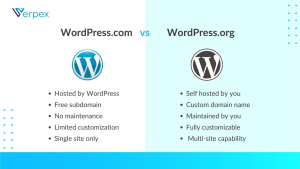
Many beginners confuse WordPress.org with WordPress.com. To clarify:
| WordPress.org | WordPress.com |
|---|---|
| Self-hosted (you own the site) | Hosted by Automattic |
| Unlimited plugins/themes | Restricted to approved tools |
| No ads or branding | Free plans include ads |
In contrast, it is ideal for long-term growth. Additionally, you can monetize freely with ads, affiliate links, or eCommerce.
How to Launch a WordPress.org Site in 5 Steps
First, follow this streamlined process:
- Choose a Host: Opt for WordPress-optimized hosting (e.g., SiteGround, Bluehost).
- Register a Domain: Pick a short, memorable name (e.g.,
yourbrand.com). - Install WordPress: Use your host’s 1-click installer (takes <5 minutes).
- Customize Design: Browse thousands of free/premium themes. For example, Astra or GeneratePress.
- Add Plugins: Install essentials like Rank Math (SEO) and WooCommerce (eCommerce).
Pro Tip: Many hosts offer free SSL certificates and site migrations to simplify setup.
Top Benefits of Using WordPress.org
Beyond customization, it offers:
- Scalability: Grow from a blog to an enterprise site seamlessly.
- Community Support: Access forums, tutorials, and developers worldwide.
- Security Control: Use plugins like Wordfence to protect your site.
- Speed Optimization: Improve SEO rankings with caching plugins.
Moreover, self-hosted sites rank better on Google due to faster load times and clean code.
Common Mistakes (And How to Fix Them)
While the platform is powerful, avoid these pitfalls:
- Ignoring Updates: Always update themes, plugins, and core files.
- Cheap Hosting: Slow servers harm SEO—invest in quality hosting.
- Plugin Overload: Delete unused plugins to boost speed.
- No Backups: Use UpdraftPlus to automate backups.
To avoid issues, audit your site monthly and prioritize performance.
Must-Have Tools for Success
To maximize your site’s potential, install these plugins:
- Yoast SEO: Optimize meta tags and readability.
- Elementor: Design pages without coding.
- WP Rocket: Speed up load times with caching.
- MonsterInsights: Track traffic via Google Analytics.
Additionally, use themes like Divi or Neve for mobile-friendly designs.
FAQs About WordPress.org
Q: Is WordPress.org free?
A: Yes! The software is free, but you’ll need hosting and a domain.
Q: Can I migrate from WordPress.com?
A: Absolutely. Follow our migration guide to switch hassle-free.
Q: Do I need coding skills?
A: Not at all. Use page builders like Elementor for easy customization.
Optimize Your WordPress.org Site Today
In summary, it is the ultimate platform for building professional, SEO-friendly websites. Whether you’re a blogger, entrepreneur, or developer, its flexibility and scalability are unmatched.
Ready to start? Explore our hosting recommendations or ask questions below!